


The Setup Screen Nobody Reads Twice
There is a moment, somewhere between naming your new PC and landing on the familiar blue wallpaper of a fresh Windows install, where most people simply want to get to the desktop. It is in that window the out-of-box experience, as Microsoft calls it where the operating system asks for an account. And for Windows 11 users since 2021, that question has grown harder to answer the way it used to.
The original poster on a late-May Reddit discussion did not ask for a workaround or a hack. They asked something simpler and more pointed: why should it be necessary? The thread, which quickly accumulated hundreds of replies, became a forum for something larger than login preference. It was a debate about what a personal computer is supposed to be connected to, what data flows automatically into the cloud, and whether a buyer walking into a store or ordering online should have to understand BitLocker recovery keys before they have even finished naming their machine.
The conversation has been simmering since Windows 11 launched. But its timing matters in 2026. Microsoft has positioned this year as one of listening. The company has rolled out updates including a notable April 2026 Security Update that refreshed Smart App Control and introduced new Windows Narrator capabilities while one of Windows 11's most visible trust friction points remains parked at the front door of every new PC that boots for the first time.
What the Community Is Saying
The Windows Central community coverage has tracked this tension for years, documenting how Microsoft account requirements have crept into setup flows in ways that frustrate users who expect the option to remain visible and straightforward. The complaint is not that a Microsoft account is useless many users value OneDrive storage, seamless Outlook integration, and the convenience of syncing preferences across devices. The frustration centers on what feels like a narrowing of choice, wrapped in language that does not fully explain the implications of clicking through.
A Windows Forum thread titled "Windows 11 Local Account Backlash: Why Setup Needs a Clear Option" captured the sentiment with unusual precision. The original poster noted that Microsoft's out-of-box experience now forces online identity, cloud recovery, and device encryption decisions before many buyers understand the tradeoffs. The thread drew a distinction that Windows users keep returning to: a workaround is not the same thing as consent. Typing a sequence of commands into a prompt after spotting a hidden bypass may satisfy enthusiasts. It does not help a parent setting up a laptop for a child, a small-business owner who prefers not to store credentials in the cloud, or anyone who simply wants the option spelled out clearly at the moment they are making the choice.
The Windows Central coverage of community reaction further underscores how the mandatory account push has landed with particular weight among users who feel that basic PC ownership the right to set up a machine without an internet connection, without a cloud identity, without encryption defaults they did not choose is being quietly renegotiated. This is not a fringe concern. It is a recurring theme in forums, in comments, and in the kind of Reddit threads that generate thousands of upvotes because they articulate something a large audience has felt but not quite named.
Why Microsoft Pushes Online Accounts
The company has legitimate reasons for its preference. A Microsoft account enables cloud backups, simplified password recovery, cross-device sync, and integration with services like Microsoft 365. For the majority of users who live inside the Microsoft ecosystem, these are genuine conveniences. When a device is lost or fails, the ability to recover files through OneDrive, or to restore settings on a new machine with a single sign-in, is the kind of experience that builds loyalty and that Microsoft has invested heavily in perfecting.
The April 2026 update reinforced this direction. Smart App Control, which prevents untrusted apps from running by default, was previously only available during fresh installations. The TechRepublic reporting on the April update noted that the feature can now be toggled on or off through Windows Security without a reinstallation a usability improvement that ties directly into Microsoft's broader vision of a secure, account-linked ecosystem. The update also brought AI-powered improvements to Windows Narrator, including image description capabilities that reflect how deeply AI features are now woven into the operating system.
There is also a security calculus. Account-linked machines can leverage Azure Active Directory credentials in enterprise environments, enable BitLocker encryption with recovery keys stored in the Microsoft cloud, and support remote wipe capabilities that matter in organizational settings. For businesses and schools deploying thousands of devices, the Microsoft account framework reduces friction and provides centralized management tools that would be significantly harder to replicate with purely local credentials.
But the same features that benefit enterprise buyers complicate the picture for individual users who did not ask for cloud recovery, who do not use OneDrive, and who find themselves signing into an account they did not plan to create simply because the local option is buried, hidden, or absent from the main setup path.
The Workaround Economy and Its Limits
For users determined to avoid a Microsoft account during installation, a small ecosystem of tools and techniques has emerged. Rufus, a popular USB bootable media creation tool, can bypass the online account requirement when installing Windows 11 by allowing users to create local accounts during the image preparation process. Command-line workarounds involving the Windows Setup screen's network connectivity prompt have circulated in enthusiast forums for years. Some users disconnect their ethernet cable or disable Wi-Fi during setup to trick the installer into offering a local account path.
These methods work. They are documented in enough places that a determined user can find them. But they share a common characteristic: they require knowledge that is not naturally surfaced during the standard setup experience. The workaround economy is a workaround precisely because the official path does not make the choice obvious. An enthusiast forum is not the right place for a first-time PC buyer to learn that they have options and the people most affected by the lack of those options are often the least likely to know where to look.
The frustration expressed in the Windows Forum thread cuts to this exact point. The original poster was not asking for a bypass. They were asking why the bypass economy exists at all. A normal consumer setup flow, they argued, should not require folk knowledge passed around by technicians. The sentiment reflects a broader expectation: that the choice between a local account and a Microsoft account should be visible, labeled clearly, and available without navigating hidden menus or typing commands during a moment when most people just want to reach the desktop.
Privacy, Control, and the AI Turn
The account question has gained new dimensions as Windows 11 leans further into AI integration. PC Gamer reported on the implications of Windows 11's shift toward agentic AI, noting that this evolution means letting AI systems interact with files on the user's machine in ways that raise natural questions about data access and control. When an operating system increasingly mediates file access through AI, the question of which account owns that data and what it is permitted to share becomes more than a login preference. It becomes a governance question.
For users who prefer local accounts, the concern is not simply about convenience. It is about keeping certain data under local control more than allowing it to flow through systems where Microsoft's cloud infrastructure can access, sync, or process it. The more AI features that require internet connectivity or account-linked services to function, the more consequential the decision becomes. A local account in 2021 meant something slightly different than a local account in 2026, because the OS itself has changed what it is connecting to.
Microsoft has acknowledged these concerns in broad terms, pointing to the security benefits that come with account-linked recovery and the enhanced protections of Smart App Control. The company has not, however, restored a first-party local account option that appears as a primary choice during the standard setup flow for Windows 11 Home or Pro. That absence continues to generate the community frustration documented in the Windows Central coverage of user complaints.
Windows 11 Pro and the Enterprise Question
A separate thread in the conversation concerns Windows 11 Pro specifically. In enterprise and education environments, Microsoft has historically offered more flexibility around account requirements, with domain join options and group policy controls that give IT administrators authority over how machines authenticate. Windows 11 Pro retains some of this flexibility, but the gap between what is possible in a managed environment and what a home user or small business owner encounters during personal setup has narrowed.
For most users whether they are installing Windows 11 Pro on a self-owned machine or receiving a PC from an employer who has not fully managed it through Intune or Azure AD the Microsoft account requirement applies in the same way it does for Windows 11 Home. The distinction matters primarily for users who understand the difference and who have access to organizational credentials that can replace a personal Microsoft account during setup.
Microsoft has shown no indication that it plans to change the fundamental requirement for personal Microsoft accounts on consumer Windows 11 installations. What the company has shown, through repeated updates to the setup experience and ongoing adjustments to how account options are presented, is a willingness to respond to feedback even if the response has not yet included a native, clearly labeled local account path in the main setup flow.
Can You Use Windows 11 Without an Internet Connection?
The practical answer is yes, with caveats. A Windows 11 installation can technically be completed without an active internet connection, though the process has grown more complicated over time. During setup, Windows 11 prompts users to connect to a network early in the process. If no network is detected, the installer may offer a limited setup path though in many cases, particularly with retail or OEM installations, the Microsoft account requirement appears before the machine is fully functional.
Users who succeed in completing setup without a network connection will find that certain features remain unavailable or limited until an account is linked. Microsoft Store apps that require sign-in, OneDrive integration, and AI-powered features like the updated Windows Narrator (which now includes on-device image description capabilities according to the April 2026 update coverage) may function partially or not at all without an online identity.
The practical reality is that a fully offline Windows 11 experience is increasingly rare and increasingly difficult to maintain not because the operating system refuses to function, but because the ecosystem of features that users expect has become cloud-dependent. For users who need true air-gapped operation, Windows 10 remains an option for some scenarios, though security updates for Windows 10 are winding down as Microsoft shifts focus to Windows 11.
Disadvantages of a Local Account
The honest accounting of local accounts on Windows 11 includes real tradeoffs. A local account does not sync passwords, preferences, or settings across devices. If a machine fails and cannot be recovered, files stored only on that device are gone unless a separate backup strategy is in place. The BitLocker recovery key, if encryption is enabled, must be stored manually printed, saved to a USB drive, or recorded somewhere the user will remember more than automatically uploaded to the Microsoft cloud.
Some Microsoft Store apps, particularly those tied to subscription services like Microsoft 365 Personal or Family, require a linked account to function fully. Gaming features tied to Xbox integration, cloud saves through Xbox Live, and cross-platform multiplayer may have limited functionality without a Microsoft account. The growing list of AI features in Windows 11, including the agentic AI capabilities that PC Gamer examined, are designed with account-linked functionality in mind.
For users who understand these tradeoffs and prefer local control, these disadvantages are a reasonable price. For users who discover them after setup when BitLocker recovery prompts appear unexpectedly, or when a cloud save was assumed to be automatic they can feel like surprises that erode trust in the system.
What This Means for Windows Readers
The conversation about Microsoft account requirements is ultimately a conversation about transparency and consent. When Microsoft makes a choice on behalf of users even a choice with legitimate security benefits that choice shapes trust in ways that go beyond the feature itself. Users who feel informed and in control of their setup experience tend to be more confident in their machines and more likely to engage with the full range of Microsoft services. Users who feel pushed through a funnel they did not choose tend to carry that frustration into their broader relationship with the platform.
The practical takeaway for readers is not that Microsoft accounts are bad or that local accounts are superior. It is that understanding what each option offers and what it hands over lets you make the choice that fits your situation more than discovering the implications after setup is complete. If you value cloud recovery, cross-device sync, and seamless integration with Microsoft services, a Microsoft account unlocks a meaningfully better experience on Windows 11. If you prefer local control, offline operation, and minimal cloud dependency, a local account remains a viable path even if it requires a little more knowledge to reach.
The community pressure has not produced a formal, supported local-account path in the main Windows 11 setup flow as of mid-2026. But Microsoft has demonstrated through its update cadence including the April 2026 Security Update that made Smart App Control more accessible that it is paying attention to how users respond to the choices it presents. The conversation is ongoing, and readers who care about this issue have grounds to believe it is worth staying engaged with how Microsoft evolves the out-of-box experience.
Where to Read Further
For readers who want to explore the community conversation in more detail, the Windows Central coverage provides an extensive record of user complaints and the workarounds that have emerged in response. The Windows Forum thread offers a detailed, reader-generated accounting of the local-account frustration from the perspective of users navigating the issue directly. The TechRepublic reporting on the April 2026 Windows 11 update provides a clean breakdown of what the most recent security and feature changes mean in practice, including the Smart App Control toggle that removes the reinstall requirement. Finally, the PC Gamer analysis of agentic AI in Windows 11 offers context for understanding how the account question intersects with the operating system's evolving AI capabilities a dimension that will likely grow more prominent as Microsoft continues to integrate AI features across the platform.
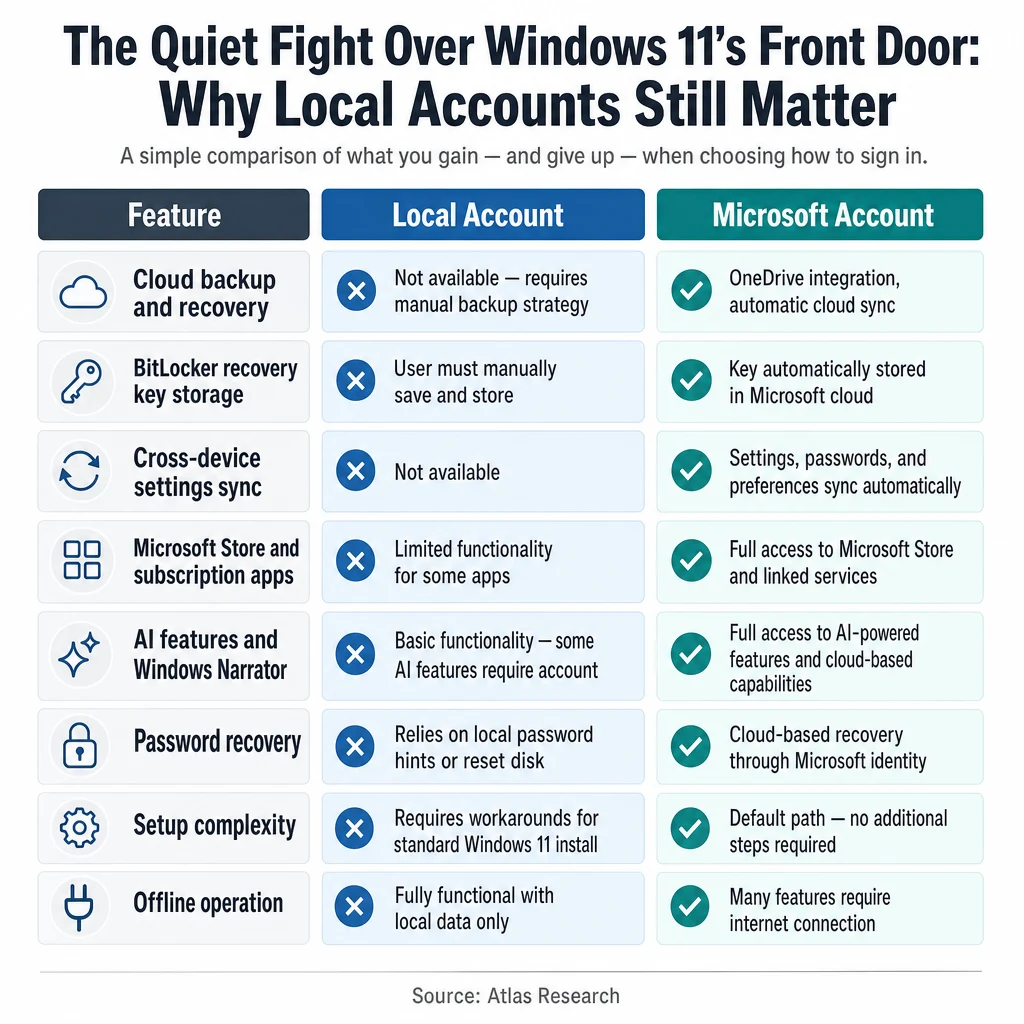
Summary Table: Local vs. Microsoft Account on Windows 11
| Feature | Local Account | Microsoft Account |
|---|---|---|
| Cloud backup and recovery | Not available requires manual backup strategy | OneDrive integration, automatic cloud sync |
| BitLocker recovery key storage | User must manually save and store | Key automatically stored in Microsoft cloud |
| Cross-device settings sync | Not available | Settings, passwords, and preferences sync automatically |
| Microsoft Store and subscription apps | Limited functionality for some apps | Full access to Microsoft Store and linked services |
| AI features and Windows Narrator | Basic functionality some AI features require account | Full access to AI-powered features and cloud-based capabilities |
| Password recovery | Relies on local password hints or reset disk | Cloud-based recovery through Microsoft identity |
| Setup complexity | Requires workarounds for standard Windows 11 install | Default path no additional steps required |
| Offline operation | Fully functional with local data only | Many features require internet connection |
The table makes clear that the tradeoffs are not trivial on either side. Choosing a local account is not simply choosing the "off" position on a feature toggle it means accepting different responsibilities and different capabilities. Choosing a Microsoft account is not simply opting into convenience it means accepting a more connected relationship with the operating system and the services it offers. Readers who understand this distinction are better equipped to make the choice deliberately, more than discovering they made it by default.